Fzzy Config

Fzzy Config mod: a config library for Minecraft

Fzzy Config gives Minecraft mods their settings screens, checks the values players type, and keeps servers and clients in step. It runs on Fabric, Quilt, Forge and NeoForge.

Sent here because a mod said it needs Fzzy Config? Pick your Minecraft version below and install the jar alongside your other mods. That is the whole job.

Download What is it?

  • 37,313,509 downloads
  • 20 Minecraft versions
  • 4 mod loaders
  • 0.7.6 latest
A Fzzy Config settings screen in Minecraft, with toggles, a number field showing a green tick, and enum buttons
A config screen drawn by Fzzy Config, screenshotted by the mod's author.

What is the Fzzy Config mod?

The Fzzy Config mod is a library. It ships no blocks, items or gameplay of its own. Other mods depend on it to build their config screens, so you install it the way you install Fabric API: because something else asked for it.

For the mods that use it, Fzzy Config writes the settings file, draws the screen, refuses values that would break the game, and syncs the result between a server and everyone connected to it. Version 0.7.6 is the current release, and the mod has been downloaded 37,313,509 times since April 2024.

If you write mods yourself, it is also an API: a plain Java or Kotlin class with public fields becomes a TOML file and a full settings screen, with one registration call and no screen-builder code.

Type
Library mod, required by mods that use it
Needed on
Client and server
Loaders
Fabric, Quilt, Forge, NeoForge
Minecraft
1.20.1 to 26.2
Price
Free
Author
fzzyhmstrs

What it does for the mods that use it

Settings screens, generated

The screen is built from the mod's config class, so there is nothing for the author to lay out by hand. Breadcrumbs, a search box, right-click context menus and a change manager that can apply, revert or restore defaults all come as standard. Screens open from ModMenu, Catalogue, or the /configure command.
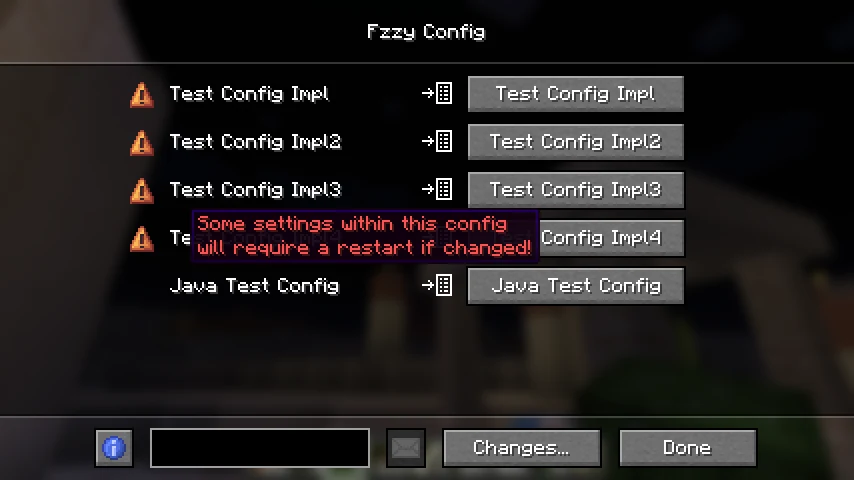
The Fzzy Config screen listing several mod configs, with an orange warning that some settings require a restart

Servers and clients stay in step

Configs sync to clients when they join. An operator can push a change to a live server without a restart, and players can forward their own settings to someone who wants the same setup. Updates that look suspect are quarantined until an admin accepts them.

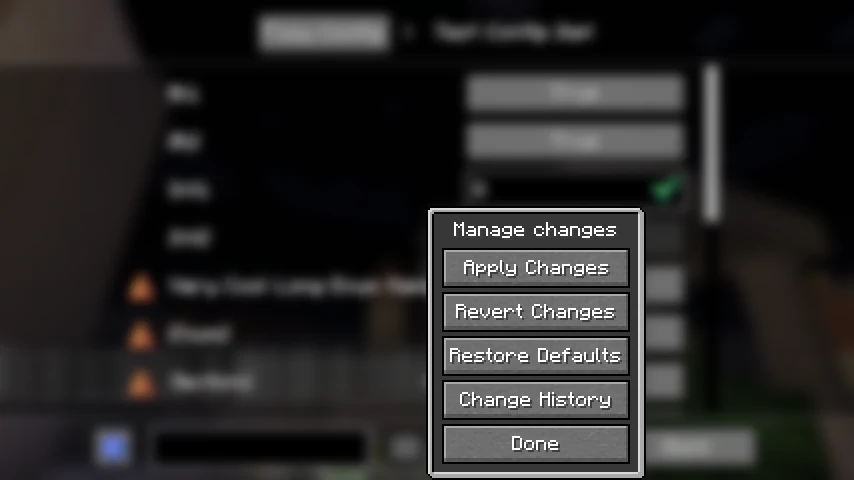
The Fzzy Config change manager open in Minecraft, offering apply changes, revert changes, restore defaults and change history

Bad values get corrected, not crashed on

Numbers, enums, colours, identifiers, tags, ingredients, keybinds and whole objects each get a widget that only accepts what fits. Edit the file by hand and put in something impossible, and Fzzy Config corrects it instead of throwing an exception at load. Identifiers and tags suggest as you type, and Tab completes them.

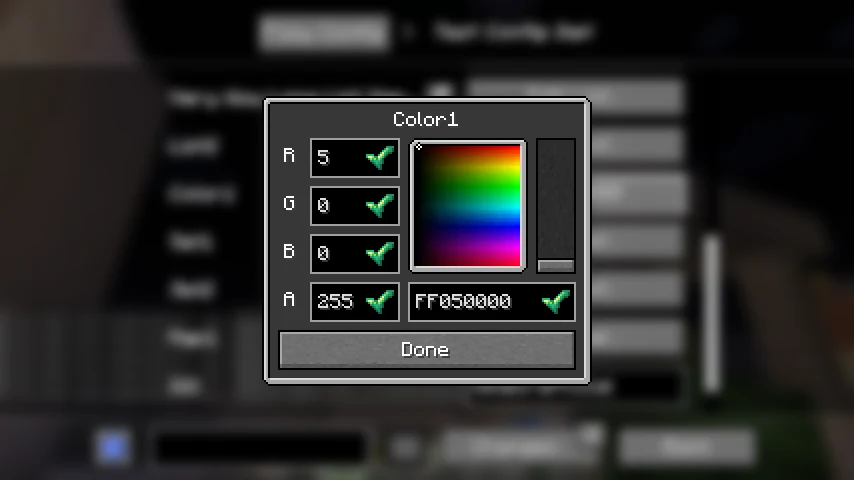
A colour picker popup in a Fzzy Config screen, with red, green, blue and alpha fields each showing a green tick

Configs survive mod updates

A mod author bumps a version number and writes one method, and old settings files migrate instead of resetting. Configs written for another library can be scraped across. Since 0.7.4, edits made to the file on disk apply live in game.

One mod, four loaders

Fabric and Quilt share a file. Forge and NeoForge get their own. The same API is behind all of them, along with a small networking layer for mods that need to send their own packets. Minecraft 1.20.1 through 26.2 are supported.

Keyboard and narrator support

Every screen can be driven from the keyboard, and the config screens use their own narrator implementation rather than the vanilla one. The author's listing notes it was "fully vetted and tested by a visually impaired member of the modding community".

What the screens look like

Screenshots taken by the mod's author, with their own captions.

A typical config screen. The breadcrumbs at the top track back to the previous config screens opened. The settings list is fully translatable and describable. settings can be searched for at the bottom.

For mod developers

You write a class. Fzzy Config writes the TOML, draws the screen, validates the values and handles the sync. There is no screen builder to implement and nothing to register beyond one call.

1. Add the repository and dependency

Fzzy Config lives on the author's own maven. The artifact is me.fzzyhmstrs:fzzy_config, with an underscore rather than a hyphen. Forge and NeoForge builds also need the Kotlin for Forge repository.

repositories {
    maven {
        name = "FzzyMaven"
        url = uri("https://maven.fzzyhmstrs.me/")
    }
    // Forge and NeoForge only
    maven { url = uri("https://thedarkcolour.github.io/KotlinForForge/") }
}

dependencies {
    // NOTE: underscore, not hyphen
    modImplementation("me.fzzyhmstrs:fzzy_config:$fzzyConfigVersion")
}

2. Write a config class and register it

Fields need to be public, non-final and non-static. Wrap one in a Validated type when you want bounds, choices or suggestions; leave it plain when you do not care.

class MyConfig : Config(Identifier.of(MOD_ID, "my_config")) {

    var enableFeature = true

    // bounded 0.0 to 10.0, corrected if the file says otherwise
    var speed = ValidatedDouble(5.0, 10.0, 0.0)

    // its own screen, with a breadcrumb back here
    var advanced = AdvancedSection()

    class AdvancedSection : ConfigSection() {
        @RequiresRestart
        var renderDistance = ValidatedInt(8, 32, 2)
    }
}

// reads the file, creates it if missing, registers screen and sync
val CONFIG = ConfigApi.registerAndLoadConfig(::MyConfig)

The docs on this site cover config classes, every validation type, every annotation and the extras that ship alongside. The licence is TDL-M, which permits use as a dependency but not bundling: no jar-in-jar, no Gradle include.

Read the docs API reference Source on GitHub

Common questions

What is the Fzzy Config mod?

Fzzy Config is a library mod for Minecraft Java Edition. It gives other mods their settings screens and config files. On its own it adds no blocks, items or gameplay, so you will not see anything new in game after installing it.

Do I need to install Fzzy Config?

Only if another mod asks for it. It is a dependency, like Fabric API. If a mod's page lists Fzzy Config as required, or the game refuses to start with a message naming fzzy_config, then yes. Otherwise there is nothing to gain from installing it by itself.

Which file should I download?

Match your Minecraft version first, then your mod loader. Fabric and Quilt use the same file. Forge and NeoForge use a separate one, marked +forge on 1.20.1 and +neoforge from 1.20.4 onward. The picker above does the matching for you.

Does Fzzy Config need to be on the server as well?

Yes. Fzzy Config is required on both client and server. Part of what it does is keep the two in agreement, so a server running mods that use it needs the jar in its mods folder too.

What else do I need to install alongside it?

Fzzy Config is written in Kotlin, so it needs a Kotlin language loader for your platform. On Fabric and Quilt that means Fabric API and Fabric Language Kotlin. On NeoForge for Minecraft 26.2 it is KotlinLangForge; on earlier NeoForge versions and on Forge 1.20.1 it is Kotlin for Forge. The download panel names the right ones for the file you picked.

How do I open a mod's config screen?

Through ModMenu on Fabric and Quilt, through Catalogue on Forge and NeoForge, or by typing the /configure command in game. Fzzy Config registers the screens itself, so mod authors do not have to.

Which Minecraft versions does Fzzy Config support?

Minecraft 1.20.1 through 26.2. That is 20 stable versions, every one of which has a download on this page, plus 14 snapshots and pre-releases that are published but not listed here. Note that 1.20.4 and 1.20.6 stopped receiving updates at version 0.5.9 and were dropped as of 0.6.0, so those two are still downloadable but frozen.

Minecraft crashes or the mod does not load. What now?

Check three things in order: that the Fzzy Config file matches your exact Minecraft version, that it matches your loader, and that the Kotlin loader it needs is installed as well. Most reports come down to one of those. If it still fails, the crash log will name the missing piece, and the author takes bug reports on GitHub.

Is Fzzy Config free, and is it safe?

It is free, and the full source is on GitHub under the Timefall Development Licence, Modified. Downloads on this page are the author's own published files, served straight from their official host.